Exporting your data
Export transcripts and documents in various formats.
Klang lets you export transcripts and documents in multiple formats for sharing, archiving, or use in other tools.
Exporting a transcript
- Open the transcript you want to export
- In the toolbar, click the Download icon
The export dialog opens with a live preview of the output on the right.
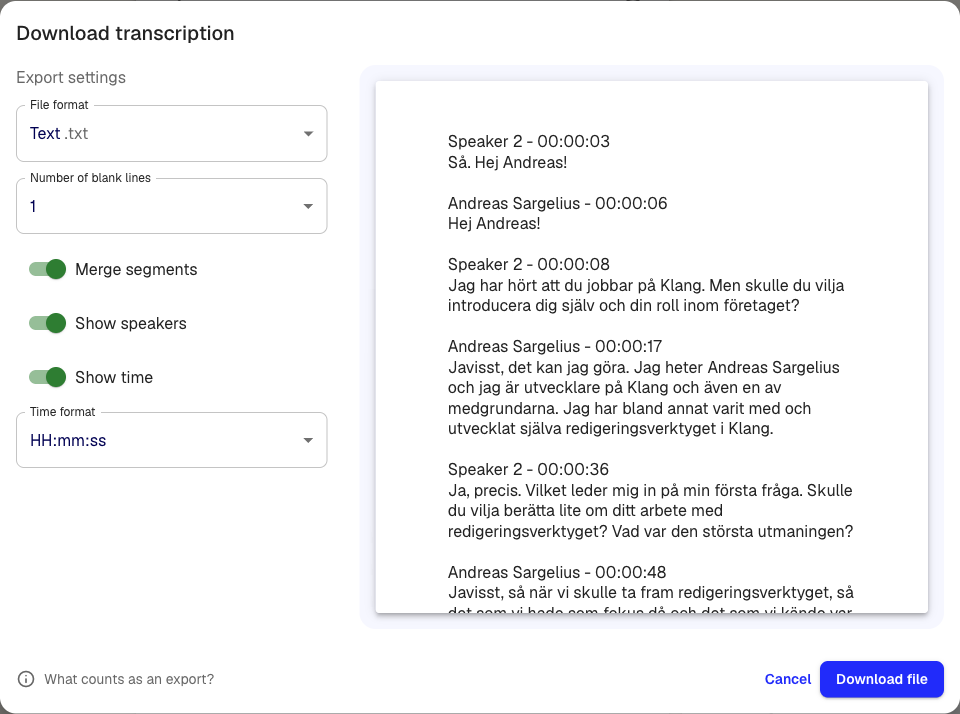
- Select a file format from the dropdown
- Configure the export options (see below)
- Click Download file
Supported formats
- Word .docx: Document with speaker labels, timestamps, and optional comments
- Excel .xlsx: Spreadsheet with one row per segment
- SRT subtitles .srt: Subtitle file for video editing
- VTT subtitles .vtt: Web-compatible subtitle file
- Avid subtitles .txt: Format for Avid editing software
- Text .txt: Plain text
- HTML .html: Formatted web page
- Table .csv: Comma-separated values
- Original media file: Download the original audio or video
- JSON .json: Structured data for programmatic use
Export options
Depending on the format, you can customize the output:
- Merge segments: Combine consecutive segments from the same speaker into one block
- Show speakers: Include or exclude speaker names
- Show time: Add timestamps to each segment
- Time format: Choose between HH:mm:ss or total seconds
- Number of blank lines: Control spacing between segments
- Export comments: Include comments in DOCX exports
The preview updates in real time as you change settings. Klang remembers your choices for next time.
Exporting documents
Documents created in analyses or by the AI can be exported as well.
- Open the document
- Click Export
- Choose DOCX or PDF
Exporting to integrations
If you have connected Google Drive, OneDrive, or Dropbox, you can export directly to your cloud storage.
- Open the transcript or document
- Click Export
- Select the integration (for example, Google Drive)
- Choose the destination folder
- Click Export
For setup instructions, see Connecting Google Drive or Connecting OneDrive.
Was this article helpful?
Your feedback helps us improve our documentation.
Suggested Articles
Need more help?
Our support team is here to help you.