Plans and limits
Compare Free, Pro, Business and Enterprise, and see the limits of each plan.
Klang has four plans: Free, Pro, Business and Enterprise. This article explains who each plan is for, what it includes, and how to upgrade.
The four plans
- Free: For getting started. Transcription of meetings and calls, the meeting assistant, the mobile app and the desktop app, summaries and chat. You see your history from the last 30 days.
- Pro: Your full history, searchable. Everything in Free, plus all your meetings however old they are, unlimited speaker identification, integrations, automations, scheduled analyses, word lists, translation of transcriptions, and export to more formats (Word, Excel, SRT, VTT).
- Business: For teams that need single sign-on (SSO), a data processing agreement (DPA) and statistics. Everything in Pro, plus:
- Your own name and picture for the meeting assistant
- Meeting video recording
- Hybrid meetings with speakers from the attendee list
- Meeting minutes
- Custom analyses
- SSO that you set up yourself
- The DPA, signed in your account
- Statistics on how the workspace is used
- Keeping a colleague’s material when they leave the workspace
- An audit log of changes in the workspace
- Verified domains, so colleagues join by invitation
- Enterprise: For organizations with their own requirements. Everything in Business, plus a private cloud with your own encryption key, installation in your own environment, access control, a custom retention period for content, a dedicated customer team with priority support and an SLA, and your own agreement and invoicing. Klang sets up Enterprise for you. Contact us to get started.
The features that used to come with the meeting module (video recording, the custom meeting assistant, hybrid meetings and meeting minutes) are now part of Business. The module can no longer be bought on its own.
Where to see prices
Prices depend on your currency and can change, so they are not listed here. To see them, open Settings → Billing → Subscription. Prices are per person and include VAT. Yearly billing costs less per month than monthly billing, and the plan page shows how much you save.
Upgrade your workspace
Only workspace admins can change the plan. If you are not an admin, ask your workspace admin.
- Open Settings → Billing → Subscription
- Under Choose a plan, choose Monthly or Yearly
- On the plan you want, click Try free for 7 days (Pro) or Choose Business
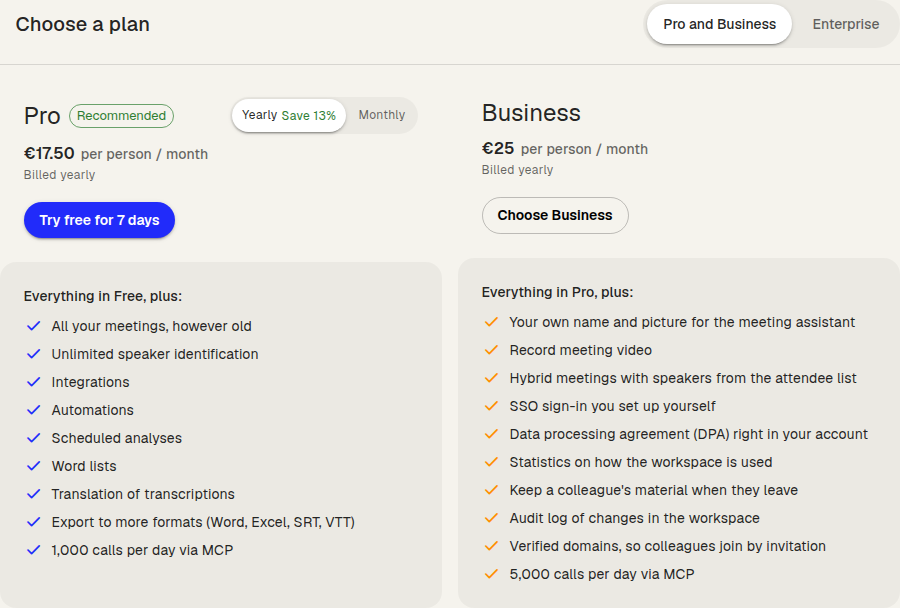
- In the Confirm your selection dialog, check the billing interval and set the Subscription size (the number of seats)
- Click Start free trial or Go to payment
- Enter your payment details in the payment portal
Pro starts with a 7-day free trial. You enter your card, but the first payment is only charged when the trial ends, and you pay nothing if you cancel before then. A workspace that has already had a trial is charged at checkout. Business has no trial, so you pay for the first period when you check out.
The Free plan’s 30-day history
On Free, you can open what was created in the last 30 days. Older meetings, files, documents and analyses are kept. The limit never deletes anything, and they open again as soon as the workspace upgrades.
An older item is locked:
- In lists and in folders, it shows its title, its date and a lock. Its content is hidden.
- When you click it, a dialog explains that it is older than 30 days. Admins can click Upgrade to Pro.
- If you open it from a link, you see a page that explains the lock instead of the item.
- Search leaves it out and shows how many older matches are locked, for example “7 older matches are locked.”
- The AI does not use it in analyses or chat, and you cannot add it as a source.
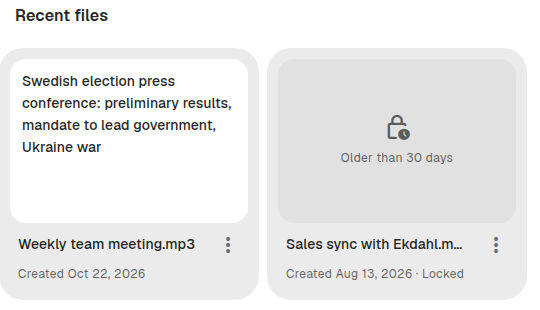
You can still delete a locked item. Private notes and to-dos are not locked.
MCP limits
Each plan includes a number of tool calls per day for AI assistants connected through MCP. The count is per workspace and resets at midnight UTC.
- Free: 30 calls per day
- Pro: 1,000 calls per day
- Business: 5,000 calls per day
- Enterprise: No limit
When 80% of the calls are used, your assistant tells you how many are left. When all are used, it tells you that the limit is reached, when it resets, and how to upgrade. The plan page also shows MCP calls today. Read more in Connecting Klang to an MCP client.
API limits
The Klang API has request limits per plan:
- Free: 50 requests per day for the whole workspace
- Pro: 60 requests per minute for each API key
- Business and Enterprise: 120 requests per minute for each API key
Read more in Managing API keys.
Was this article helpful?
Your feedback helps us improve our documentation.
Suggested Articles
Reviewing the audit log
See who changed members, seats, sign-in rules, and agreements.
Cancelling your subscription
Cancel your Pro or Business subscription in Klang, and undo it if you change your mind.
Changing your plan or billing interval
Switch between Pro and Business, or between monthly and yearly billing.
Need more help?
Our support team is here to help you.