Pausing your subscription
Pause a monthly subscription for 1 to 3 months instead of cancelling it.
If you do not need Klang for a while, you can pause a monthly subscription for 1, 2 or 3 months. You pay nothing during the pause, and your workspace keeps all its data.
Before you start
- Only workspace admins can pause the subscription.
- You can pause monthly Pro and Business plans. Yearly plans and trials cannot be paused.
- The subscription must be active, with no waiting plan change and no payment waiting to be confirmed.
Pause your subscription
You pause from the cancellation flow, when you say you do not use Klang enough.
- Open Settings → Billing → Subscription
- Under Active plan, click More options (⋮), then Cancel subscription
- Choose I don’t use it enough, then click Continue. On Business, Klang first suggests switching to Pro. Click No thanks to see the pause.
- On Pause instead?, choose 1 month, 2 months or 3 months. The dialog shows the date billing resumes.
- Click Pause subscription
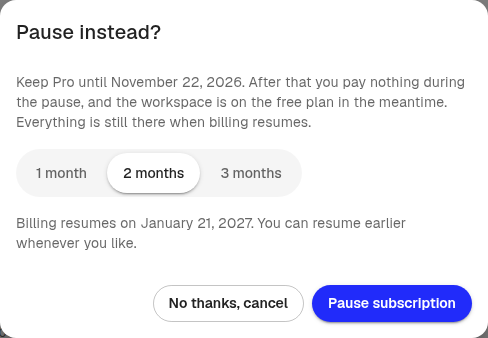
Your subscription is not cancelled. You can do the same in the Klang mobile app, under Settings.
What happens during the pause
- Until the current period ends: You keep your plan. You have already paid for this period.
- During the pause: The workspace is on the Free plan, and you pay nothing. Free plan limits apply, for example meetings and files older than 30 days are locked. See Plans and limits.
- When the pause ends: Billing resumes on the date you saw, and your plan comes back with the same seats.
Nothing is deleted during the pause. Everything opens again when your plan comes back.
Undo or end the pause
A notice above your plan shows the pause and its dates.
- Before the pause starts: Click Undo pause. Your subscription continues as usual, and nothing extra is charged.
- During the pause: Click Resume now to get your plan back today. A new billing period starts today, and you pay for it.
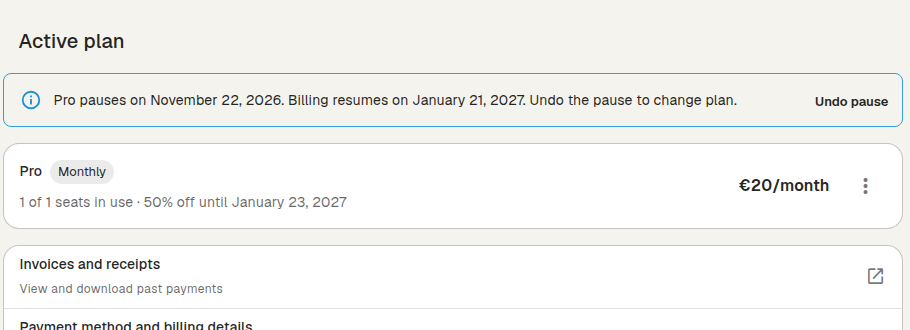
If the payment for Resume now does not go through, the pause stays. Update your card under Payment method and billing details, then try again.
Good to know
- You cannot change plan or seats while the subscription is paused. Undo the pause or resume the subscription first.
- If you cancel during a pause, the subscription ends instead of continuing after the pause. The workspace stays on the Free plan.
- If Klang support paused your subscription for you, contact support to change it.
Was this article helpful?
Your feedback helps us improve our documentation.
Suggested Articles
Reviewing the audit log
See who changed members, seats, sign-in rules, and agreements.
Cancelling your subscription
Cancel your Pro or Business subscription in Klang, and undo it if you change your mind.
Changing your plan or billing interval
Switch between Pro and Business, or between monthly and yearly billing.
Need more help?
Our support team is here to help you.